NYSCEF stands for New York State Courts Electronic Filing. It is the electronic filing system used by the New York State Unified Court System for filing and serving legal papers electronically in eligible cases and courts.
People searching for “NYSCEF login” may be trying to sign in, create an account, reset a password, file court documents, or search for a case.
Quick Information
| Information | Details |
| System | NYSCEF |
| Full Name | New York State Courts Electronic Filing |
| State | New York |
| Operated by | New York State Unified Court System |
| Main purpose | Electronic court filing and service |
| Users | Attorneys, litigants, filing agents and other authorized users |
| Public case search | Available without an account |
| Resource Center | 646-386-3033 |
| nyscef@nycourts.gov |
NYSCEF Login
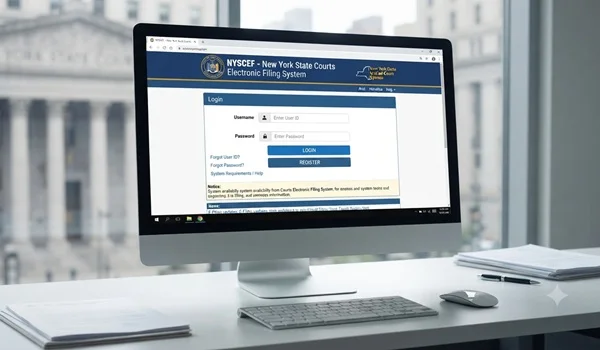
The official NYSCEF login page is available through the New York Courts website: https://iapps.courts.state.ny.us/nyscef/Login
To sign in, enter your NYSCEF User Name and Password and select the login option. The official NYSCEF manual confirms that users must have valid credentials to access the live system.
Who Can Use NYSCEF?
NYSCEF is available to different types of authorized users, including:
- New York attorneys
- Attorneys admitted pro hac vice
- Unrepresented litigants
- Filing agents
- Other authorized participants
New York attorneys with an Attorney Online Services (AOS) account may use their attorney registration number and AOS password to access NYSCEF.
How to Create a NYSCEF Account
If you do not already have a NYSCEF account, the registration process depends on your role.
Attorneys, self-represented litigants, filing agents, and other users may have different registration procedures.
The official NYSCEF system provides a Create Account option on the login page. Users should select the account type that applies to them and follow the instructions provided by the court system.
NYSCEF Login for Attorneys
New York attorneys who have an Attorney Online Services account can generally use their Attorney Registration Number as the NYSCEF User ID along with their AOS password.
This allows eligible attorneys to access the NYSCEF system without maintaining a separate set of credentials for that access.
NYSCEF Login for Self-Represented Litigants
People representing themselves can also participate in NYSCEF in situations where electronic filing is available.
The New York court system explains that unrepresented litigants may choose to participate in e-filing, and separate user credentials may be required depending on the case.
If you are representing yourself, check the requirements for the specific court and case type before attempting to file.
Forgot Your NYSCEF Password?
If you forget your NYSCEF username or password, use the recovery option on the login page.
The NYSCEF user manual states that users can select the appropriate forgotten-credential link and provide the requested information. Depending on the information provided, recovery instructions can be sent by email. https://iapps.courts.state.ny.us/nyscef/Login
Can You Search NYSCEF Without Logging In?
Yes.
You do not necessarily need an NYSCEF account simply to search publicly available NYSCEF case information.
The official system provides a “Search as Guest” option. Public searches can be performed using information such as:
- Case identifier
- Party or litigant name
- Attorney name
- County
- Case type
- Filing date range
This makes NYSCEF useful not only for attorneys and litigants but also for members of the public researching eligible court cases.
What Can You Do After NYSCEF Login?
Depending on your account and authorization, NYSCEF can allow users to:
- File legal documents
- File documents in existing cases
- Start eligible cases
- Review case information
- Receive electronic notifications
- Serve documents electronically
- Manage account information
- Track electronic filings
NYSCEF is used only for eligible courts and case types designated for electronic filing.
Is NYSCEF Available for Every New York Case?
No.
Electronic filing is authorized for certain case types and designated courts or counties. The applicable requirements can vary by court and case.
Before filing, users should verify that their particular case is eligible for NYSCEF e-filing.
NYSCEF vs. WebCrims
NYSCEF and WebCrims serve different purposes.
| NYSCEF | WebCrims |
| Electronic filing system | Criminal case information search |
| File court documents | Search eligible criminal cases |
| Used by authorized participants | Primarily used for public case information |
| E-filing and electronic service | Court case and appearance information |
New York Courts lists both NYSCEF and WebCriminal among its online court services.
NYSCEF Training System vs. Live System
NYSCEF has both a Live System and a Training System.
The Training System is intended for educational purposes and does not submit real filings or perform real court actions. The Live System is the operational system used for actual cases.
Users should make sure they are using the Live System when they need to file documents in a real case.
NYSCEF Help and Support
If you have problems with your account, login, filing, or other NYSCEF functions, the official NYSCEF Resource Center provides assistance.
Phone: 646-386-3033
Email: nyscef@nycourts.gov
Hours: 8:00 a.m. – 5:00 p.m.
Frequently Asked Questions
What is NYSCEF?
NYSCEF is New York’s electronic court filing system that allows eligible users to file and serve legal documents electronically in designated cases and courts.
Where is the NYSCEF login page?
You can access the official login page through the New York State Courts website.
Can I search NYSCEF without an account?
Yes. Public case searches can be performed using the Search as Guest option.
Can self-represented people use NYSCEF?
Yes. Unrepresented litigants can participate in NYSCEF where electronic filing is available, subject to the applicable requirements.
What should I do if I forget my NYSCEF password?
Use the password-recovery option on the official NYSCEF login page and follow the instructions provided.
Is NYSCEF the same as WebCrims?
No. NYSCEF is primarily an electronic filing system, while WebCrims is used to search eligible New York criminal court information.
Can I file documents through NYSCEF?
Yes, if your case and court are eligible for NYSCEF electronic filing and you have the appropriate authorization or account.
Final Takeaway
NYSCEF Login provides access to New York’s electronic court filing system. Attorneys, self-represented litigants, filing agents, and other authorized users can use the system for eligible court matters.
If you only want to search publicly available case information, you may be able to use NYSCEF’s Search as Guest option without logging in.
For account, filing, or login problems, the official NYSCEF Resource Center can be contacted at 646-386-3033 or nyscef@nycourts.gov.
Disclaimer: This article is for general informational purposes only and is not legal advice. NYSCEF availability, filing requirements, court procedures, and account requirements can vary by case and court. Always verify current requirements through the official New York State Unified Court System.